One desktop app on Mac and Windows: Tauri, Rust, and what I wouldn't do twice
A lot of desktop advice still assumes you'll build a native UI for each OS and hope the two versions stay in sync. We didn't want that. We wanted one design, one engine, and two installers.
This is the stack I'd pick again for a local utility, the kind of app that scans files, sorts them by rules, calls OS APIs, and maybe runs a small on-device model: Tauri 2 for the window, React for the interface, and Rust for everything that could damage a user's files.
Tauri 2 can also build for iOS and Android. That's a real option, but mobile is clearly less mature than desktop.
These notes come from building and shipping that kind of app, not from a framework's marketing page. The goal was simple: keep the Mac app, the Windows app, a command-line tool, and a weekly scheduled job on one set of rules, and ship signed installers for both platforms without ending up with two products.
Contents
- What Tauri plus Rust actually is
- The trade-off we accepted
- Why Tauri, not SwiftUI or a Windows UI kit
- Why Rust, not Swift, Kotlin Multiplatform, C#, or C++
- Could you build Slack or ClickUp with it?
- Mobile: you can, but probably not the same app
- On-device AI that works the same on Mac and Windows
- Performance: what to measure
- Local data
- Design patterns that survive a second OS
- CI/CD and code signing
- Checklist
1. What Tauri plus Rust actually is
Tauri is a thin native shell around the web view the OS already has: WKWebView on macOS and iOS, WebView2 on Windows, and the system WebView on Android. Your interface is HTML, CSS, and JavaScript (we use React). The real work happens in Rust, and the web view talks to it through a small messaging layer.
That's the opposite of Electron, which bundles its own copy of Chromium with every app. It's also the opposite of SwiftUI, where the interface is tied to Apple's platforms.
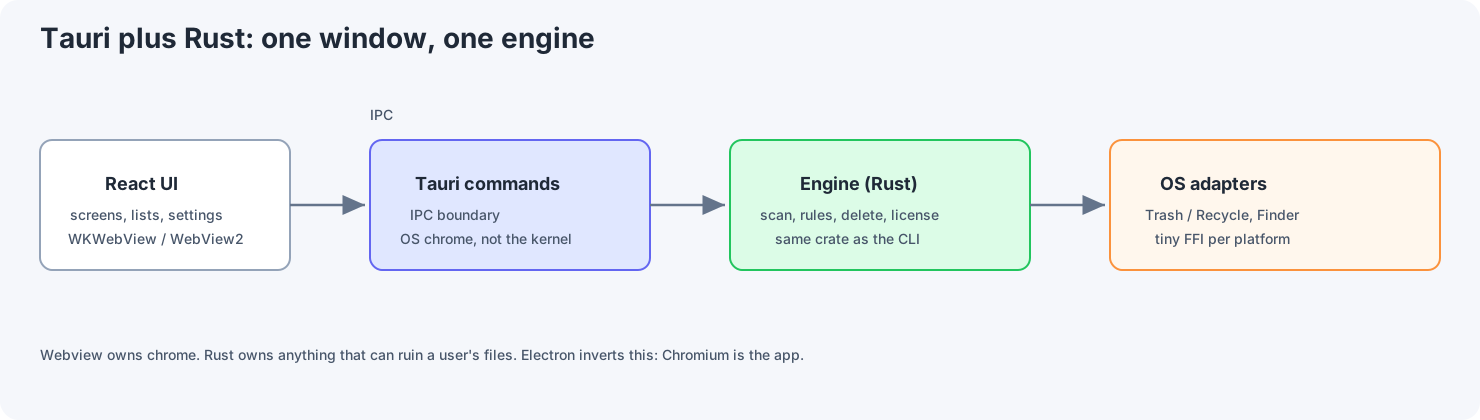
Here's who owns what:
| Piece | Owned by |
|---|---|
| Window, title bar, menus | Tauri (native OS) |
| Screens, lists, settings | React |
| Scanning, rules, deleting, licensing, scheduling | Rust |
| Trash / Recycle Bin, Finder, Explorer | A small amount of OS-specific Rust or native code |
If you put the risky logic in React, you'll end up rewriting it for the CLI and again for the scheduled job. We didn't.
2. The trade-off we accepted
We gave up native widgets and a faster first version on one platform. In return we got one engine and one design.
What we gave up:
- The native look. A web view styled with CSS will never feel quite like macOS System Settings.
- A great mobile app. Tauri on iOS and Android is a way to reuse code, not a way to build a phone-first product.
- Easy hiring. Rust with some native interop is harder to hire for than C# on Windows or Swift on Mac.
- Speed on day one. A SwiftUI prototype is quicker to write. It's the third copy of the delete logic that gets expensive.
What we got:
- Mac and Windows are the same product, not two roadmaps.
- The app, the CLI, and the scheduled job can't each make up their own rules for what goes to the Trash.
- A small installer, with no bundled Chromium.
- On-device AI text that falls back to fixed wording when the model isn't available, instead of a separate AI stack per OS.
If your product is basically a website in a window, this is the wrong trade, and Electron is the better choice. If your product is OS APIs plus a set of rules, this is the trade I'd make again.
The rest of this post goes through that trade in detail.
3. Why Tauri, not SwiftUI or a Windows UI kit
SwiftUI is the right choice if the product is Mac-only and you want the most native feel, widgets, and the full Apple toolchain. The cost shows up the day you need Windows: it's a second product. You don't "just add a Windows version later." You hire a Windows team, or the Windows version stalls.
WinForms, WPF, or WinUI is the same story in reverse. They're fine for an internal Windows tool, and painful if the Mac build is supposed to be the same app.
Electron would have given us one UI, but we'd be shipping Chromium, using more memory, and dealing with large update downloads. For a disk utility that people leave running in the menu bar, that's the wrong default.
Tauri is the sensible middle ground: one React UI, a web view the OS keeps updated, and Rust for the core.
SwiftUI vs Tauri, in code
The same job in both: show a list of leftover files, let the user confirm, then move them to the Trash. In SwiftUI, the list and the action that deletes things naturally end up in the same place:
struct ReviewView: View {
    @State var items: [Leftover] = []

    var body: some View {
        List($items) { $item in
            Toggle(item.title, isOn: $item.selected)
        }
        Button("Move to Trash") {
            Task { try await TrashService.move(items.filter(\.selected)) }
        }
    }
}
That works fine. Six months later, TrashService is also being called from a CLI, a scheduled launchd job, and a "just this once" special case. Now you have three ways to delete files.
With Tauri, the list stays simple, and Rust owns the decision:
#[tauri::command]
fn purge_execute(state: tauri::State<'_, App>, ids: Vec<String>) -> Result<Receipt, String> {
    let plan = state.engine.plan_purge(&ids).map_err(|e| e.to_string())?;
    state.engine.execute_purge(&plan).map_err(|e| e.to_string())
}
async function confirmTrash(ids: string[]) {
  const receipt = await invoke<Receipt>("purge_execute", { ids });
  setReceipt(receipt);
}
React can't invent a new way to delete things. The CLI calls the same execute_purge. That's the whole point of the split.
The SwiftUI version is shorter on day one. The Tauri and Rust version is longer on day one, and cheaper once Windows, the CLI, and the scheduled job show up. It's the same trade as section 2, in code.
4. Why Rust, not Swift, Kotlin Multiplatform, C#, or C++
The UI toolkit isn't the hard part. The hard part is one set of rules that behaves the same on Mac, on Windows, and in a CLI with no UI at all.
| Option | What you get | What you pay |
|---|---|---|
| Rust | One engine crate, memory safety, and a CLI from the same code. Unsafe code stays at the OS edges. | Harder hiring, and slower UI work unless the web view handles the interface. |
| Swift | The best Mac APIs, and SwiftUI. | Swift does run on Windows, but the tooling and libraries there are much thinner. In practice, Windows becomes a second codebase. |
| Kotlin Multiplatform | Shared logic, and a good mobile story. | Desktop is its weakest target, ONNX Runtime and OS trash APIs aren't well covered, and you still need separate UIs. |
| C# (.NET MAUI, Avalonia) | Easy to hire for, and strong on Windows. | Mac support is weaker, and native Mac features like the Trash and signing take extra work. |
| C++ | Fast, and runs everywhere. | Memory bugs are easy to introduce and hard to track down on two OSes. Only worth it if you already have a strong C++ team. |
Why Rust works well for this kind of app
- One
Engineserves the GUI, the CLI, and the scheduled job (Task Scheduler on Windows,launchdon Mac). - The core stays clean: no hard-coded paths like
~/Libraryinside the business logic. - Calling CoreML or DirectML through a crate isn't pretty, but it's one piece of glue code in one language, not two.
- There are no garbage-collection pauses during a long file scan.
The downsides
- A web view styled with CSS isn't native. You'll fight spacing and fonts.
- Async Rust alongside a UI needs discipline: one lock around the engine, and never block the web view.
- Build times and debugging are slower than Swift in Xcode.
- You'll still write some Objective-C or Windows API code. Rust doesn't make the OS go away.
I'd choose Kotlin Multiplatform if the same logic had to run in strong native iOS and Android apps next year. For two desktop platforms and a CLI, Rust is the shorter path. And if mobile later needs a fully native feel, you can keep the Rust core and put SwiftUI or Jetpack Compose on top of it with UniFFI. That's a separate product decision, not a Tauri setting.
5. Could you build Slack or ClickUp with it?
A desktop client that looks like Slack? Yes, with some caveats.
Slack or ClickUp as a whole company? That isn't a UI framework question. It's sync, search, presence, billing, and a lot of backend services.
Where Tauri does well:
- Multiple windows (since Tauri 2).
- Deep OS integration: notifications, the system tray, file dialogs, and custom URL links.
- A large React interface for settings, lists, and editors.
Where it gets hard:
- Very long lists. A list with 100,000 items in the web view needs virtualization, just like on the web. A native table view still handles extreme cases better.
- Realtime features depend on your protocol, such as WebSockets, not on Tauri. Rust can own the connection while React renders the results.
- Collaborative editing belongs in a dedicated library, not in the messaging code between the web view and Rust.
- App Store sandboxing is a policy question. Tauri apps can be distributed outside the store, as most pro tools are.
Slack and ClickUp both already had web apps and web teams, so Electron was the natural fit for them. If your product is a website with a desktop wrapper, Electron is still the honest default. If your product is local data plus OS APIs, Tauri is the better shell.
I wouldn't start building Slack from scratch in Tauri. I would start a local-first or OS-heavy desktop app in Tauri without hesitating.
6. Mobile: you can, but probably not the same app
Tauri 2 builds for iOS and Android with the same React UI and the same Rust code, running in a different web view. There are plugins for things like sharing, some file access, and the camera. That's enough for a companion app: license status, a summary, and a settings screen.
It's not enough to treat a phone like a small Mac.
| Desktop Tauri | Mobile Tauri | |
|---|---|---|
| Maturity | Ready for a production utility | Newer, with gaps in plugins. App store review can surprise you. |
| Background jobs | launchd and Task Scheduler | iOS heavily restricts a weekly job. You need native code or you drop the feature. |
| Files | App support folders and known tool paths | Sandboxed. You can't browse another app's files the way you can on a Mac. |
| Look and feel | Fine if you design for a web view | Feels like a website unless you put real time into the UI |
| Distribution | Notarization and Authenticode signing | Privacy forms, encryption declarations, background limits, and in-app purchase rules |
So it depends on what you're building:
- An OS-heavy desktop utility: keep the mobile app small, or skip it until desktop is signed and stable. Don't tell the team "one binary, three stores."
- A CRUD app, chat, or dashboard that's already a web app: Tauri on mobile is in the same category as Capacitor. It's workable, but not automatically better than React Native if mobile is the main product.
- A mobile app that has to feel native: share the Rust core through UniFFI and build the UI in SwiftUI and Jetpack Compose. You keep the core and drop the idea of one web view everywhere.
7. On-device AI that works the same on Mac and Windows
The goal here is modest: optionally write nicer explanation text, on the user's own machine. Deciding what a file is and whether to delete it stays rule-based. If the model is missing or the GPU session won't start, the app shows the standard wording from the rule catalog and carries on. Scans never call the cloud.
We use one model file with two execution providers:
| OS | Runtime | If it fails |
|---|---|---|
| macOS | ONNX Runtime with CoreML | Show the catalog text. Don't silently fall back to the CPU. |
| Windows | ONNX Runtime with DirectML | Same. |
Don't use Apple's Foundation Models on Mac and something different on Windows. You'll end up debugging two prompts and two sets of failures, with a support matrix that looks like two products.
Link ONNX Runtime into the signed app (through the ort crate) instead of putting its .dylib or .dll in a separate download. The download should only be the model weights plus a manifest with a checksum, the file size, and the list of templates. Host it on object storage such as Cloudflare R2 or S3. When the user taps Install, show the size, download it, verify the checksum, and unpack it into the app's support folder. Scans never touch the network.
Keep the model small. A few megabytes of a model that picks between fixed templates is enough to fill in placeholders like {size} and {when}. A 100 MB+ instruction-following model is a different product, with a tokenizer, memory cost, hallucinations, and differences between CoreML and DirectML. Save that for a later version, and keep it display-only.
The shape that stays honest:
features [1, F]  ->  logits [1, N]
Rust picks the highest score, then fills that template from templates.json
If N != number of templates, or the checksum fails -> use catalog text
Never let the model decide what goes to the Trash. If you add a junk_score, it's a label on screen, not an input to the delete planner.
On a phone, the same model pack is usually the wrong idea because of heat, app size limits, and the same rule that the model never classifies files. Desktop comes first.
The trade here is simpler, smaller text that's the same on both platforms, instead of a flashy built-in AI that only exists on one OS.
8. Performance: what to measure
Public "Tauri vs Electron" comparisons mostly agree on installer size and idle memory use. Treat these as rough ranges, not lab results:
| Typical Electron utility | Tauri with the system web view | |
|---|---|---|
| Installer size | 80 to 200 MB+ | Tens of MB, without Chromium or a large model |
| Idle memory | Often 150 MB+ | Often well under 100 MB for a simple app |
| Scanning files | Depends on JavaScript vs native code | Rust is in the same range as C++ or Swift |
What actually mattered for us:
- Don't scan the whole home folder. Scan the known paths where tools leave files. The app isn't a Finder replacement.
- One worker and one engine lock. Send progress events to the web view. Cancelling sets a flag; it doesn't start a second scanner.
- Unload the ONNX session after some idle time (minutes, not seconds), so the weekly job doesn't hold on to a GPU context forever.
- Profile the web view for list stutter before you start rewriting Rust code.
If your bottleneck is "SwiftUI would render this table 8 ms faster," you're fighting the wrong battle. If your bottleneck is "Windows and Mac disagree about what's safe to delete," you have the wrong architecture.
9. Local data
For local data on desktop, use SQLite: one file, with WAL mode and a busy timeout so the app, the CLI, and the scheduled job can all use it at the same time.
Put it in the OS's app data folder, not inside the app bundle, which gets replaced on every update:
macOS:    ~/Library/Application Support/<App>/state.sqlite
Windows:  %LOCALAPPDATA%\<App>\state.sqlite
(%LOCALAPPDATA% is usually the better fit than %APPDATA% for machine-specific state, since %APPDATA% can roam between computers on managed networks.)
What belongs in SQLite:
- Preferences such as theme and toggles.
- The last scan result, as a cache, not as the source of truth.
- Receipts for undo, keyed by item IDs and trash references, not display names.
- A license file, if you verify licenses offline.
What doesn't:
- The rule catalog. Ship it inside the app as YAML or similar, versioned with each release. Don't download rules during a scan.
- The model weights. Keep them as files on disk, with the checksum in
pack.json.
Skip Core Data, Realm, and a local Postgres. Version 1 has no sync server. If you add sync later, SQLite stays as the local cache.
WAL mode with a short busy timeout is better than putting one big lock around the whole engine and hoping. You still want the engine lock to keep the business rules consistent; SQLite's job is just to store data safely.
Mobile can use the same schema inside the app sandbox. Just don't treat iCloud or Google backup as your sync system unless you designed it that way.
10. Design patterns that survive a second OS
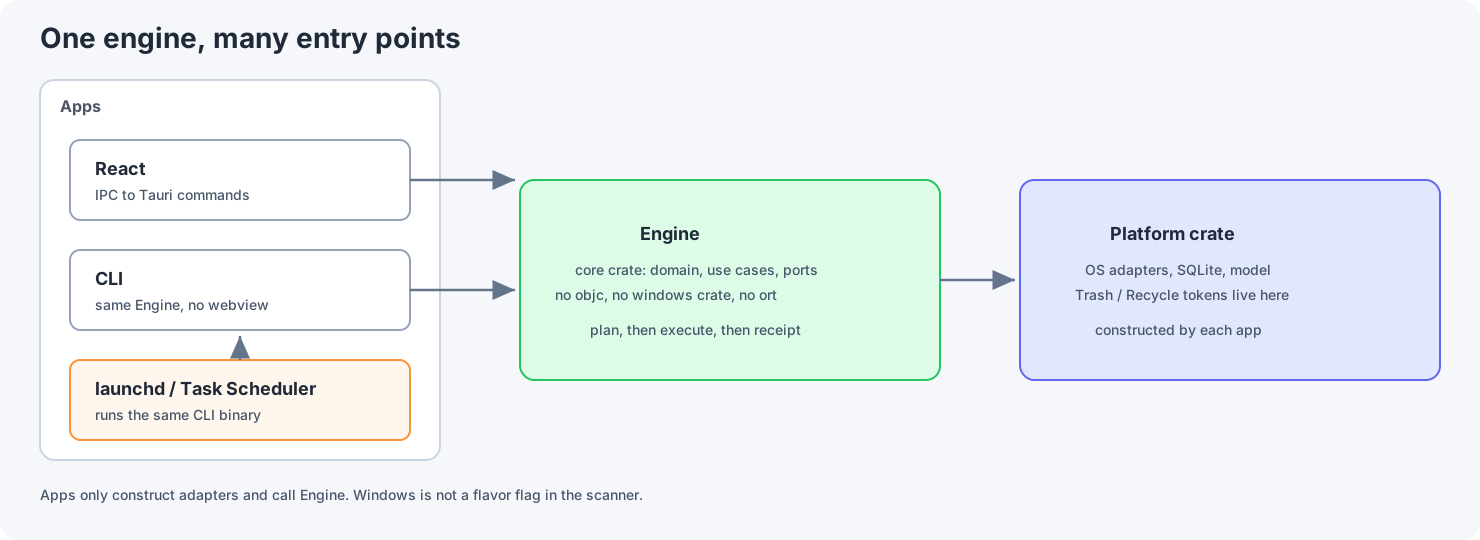
Ports and adapters
The core crate holds the domain logic and the interfaces it needs, with no objc, no windows crate, and no ort. A platform crate holds the OS adapters, SQLite, and the model code. Each app (desktop, CLI, and later maybe mobile) just creates the adapters and calls Engine.
One way to delete
Plan first, then execute. If something fails partway, write a receipt for what did happen. Restoring uses the OS Trash or Recycle Bin, not files you moved into a hidden folder of your own.
Rules, not machine learning, for classification
Supporting a new tool means adding a YAML file with its paths and process names, not a new crate.
Fail safe
If the model is down, permission is denied, or the target app is still running, skip the item or fall back to the catalog. Never "try to delete it anyway."
None of this is exotic. The usual mistake is treating Windows as a flag inside the scanner, or treating iOS as "the same app in a smaller window."
11. CI/CD and code signing
If you care about Windows, build on GitHub Actions, not on a laptop. Use the macos-latest and windows-latest runners. Expect the first build to take a lot longer than later ones, because Rust dependencies and native libraries like ONNX Runtime have to be downloaded and compiled before caching helps.
Unsigned builds are fine for internal testers. A public Mac release needs a Developer ID certificate and Apple notarization. A public Windows release needs Authenticode signing. Note that since 2024, even an EV certificate no longer skips Microsoft SmartScreen's warning straight away, so new apps build up reputation over time either way. Plan for this early, because none of it is a Tauri feature.
If you add mobile later, it means Xcode and Google Play pipelines on top of this, not a third job copied from tauri build. Treat it as a separate pipeline.
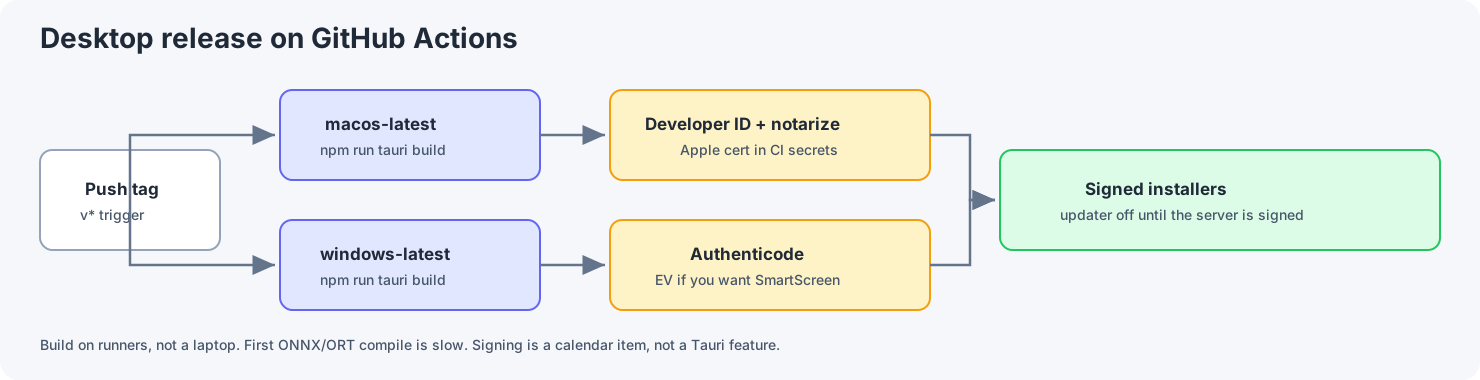
Here's an outline of a real desktop release workflow (the names are examples):
name: release
on:
  push:
    tags: ["v*"]

jobs:
  macos:
    runs-on: macos-latest
    steps:
      - uses: actions/checkout@v4
      - uses: dtolnay/rust-toolchain@stable
      - uses: actions/setup-node@v4
        with:
          node-version: "22"
      - run: npm ci
        working-directory: apps/desktop
      - run: npm run tauri build
        working-directory: apps/desktop
        env:
          # Signing
          APPLE_CERTIFICATE: ${{ secrets.APPLE_CERTIFICATE }}
          APPLE_CERTIFICATE_PASSWORD: ${{ secrets.APPLE_CERTIFICATE_PASSWORD }}
          APPLE_SIGNING_IDENTITY: ${{ secrets.APPLE_SIGNING_IDENTITY }}
          # Notarization
          APPLE_ID: ${{ secrets.APPLE_ID }}
          APPLE_PASSWORD: ${{ secrets.APPLE_PASSWORD }}
          APPLE_TEAM_ID: ${{ secrets.APPLE_TEAM_ID }}

  windows:
    runs-on: windows-latest
    steps:
      - uses: actions/checkout@v4
      - uses: dtolnay/rust-toolchain@stable
      - uses: actions/setup-node@v4
        with:
          node-version: "22"
      - run: npm ci
        working-directory: apps/desktop
      - run: npm run tauri build
        working-directory: apps/desktop
        # Authenticode: configure signing in tauri.conf.json,
        # or sign the installer with signtool after the build.
tauri.conf.json is where the bundle ID, the Windows installer type (NSIS or MSI), and the minimum macOS version live. Leave createUpdaterArtifacts off until you've set up the updater properly. Tauri's updater requires its own signing key, separate from your code-signing certificates, plus somewhere reliable to host the updates.
What goes in git vs CI secrets
| In git | In CI secrets |
|---|---|
| Bundle ID, window size, NSIS per-user install | Apple certificate and password, Apple ID, notarization password |
| Public key for verifying licenses | Windows signing certificate, updater signing key, R2 keys for uploading models |
Don't build in a model download URL that needs a secret. A public HTTPS URL plus a SHA-256 checksum in the app is enough for the first version.
The local dev loop
cd apps/desktop
npm install
npm run tauri dev
Rust rebuilds when you change it, and the web view reloads. That fast loop is a big part of why Tauri is cheaper than maintaining separate Xcode and Visual Studio projects.
12. Checklist
Before you take this stack to a design review, check that:
- The product is OS APIs plus a set of rules, not a website in a window. If it's a website, use Electron.
- All risky logic lives in one Rust
Engine. The app, the CLI, and the scheduled job can't each have their own way to delete files. - The core crate has no
objc,windows, orortdependencies. Platform adapters are created at the edges. - Deleting means planning first, then executing. Partial failures write a partial receipt. Restoring uses the OS Trash or Recycle Bin.
- On-device AI is an optional download on the same ONNX Runtime (CoreML on Mac, DirectML on Windows), with a checksum and a fallback to catalog text. The model never decides what goes to the Trash.
- SQLite lives in the app data folder with WAL on and receipts for undo. Rules ship inside the app.
- CI builds for both platforms. Public Mac releases are signed with a Developer ID and notarized. Public Windows releases are Authenticode-signed. The updater stays off until it's set up properly.
- Mobile, if you do it, reuses the core. It isn't the Mac file scanner squeezed onto a phone.
If your app is a website in a window, stay with Electron (and maybe Capacitor on phones). If your app is OS APIs plus a set of rules, Tauri and Rust is the desktop stack I'd defend in any design review. Mobile can wait until that's true.