Next.js on a 2GB VPS: what broke in real CI/CD
Production runs on a small Vultr VPS: 1 CPU, 2GB RAM. Cloud Run stays as failover only. Builds never run on the box. We push main and GitHub Actions handles the rest.
Notes below are from a real deploy: what worked, what broke, and what we changed.
Context: what we chose and what we skipped
The project is one monorepo with two Next.js apps on one domain:
- Marketing / main site (
/): Next.js at the repo root - Product app: lives in
apps/web, public under/apps/<product-slug>
Two apps, two containers, one domain.
We kept GCP Cloud Run as failover so we can point DNS back if needed. Primary production is the VPS because it is cheap, controllable, and enough for this stage.
A 2GB VPS does not build Next.js on-server. next build eats RAM. Build on GitHub Actions, push images to GHCR, deploy to the VPS.
Architecture (compact)
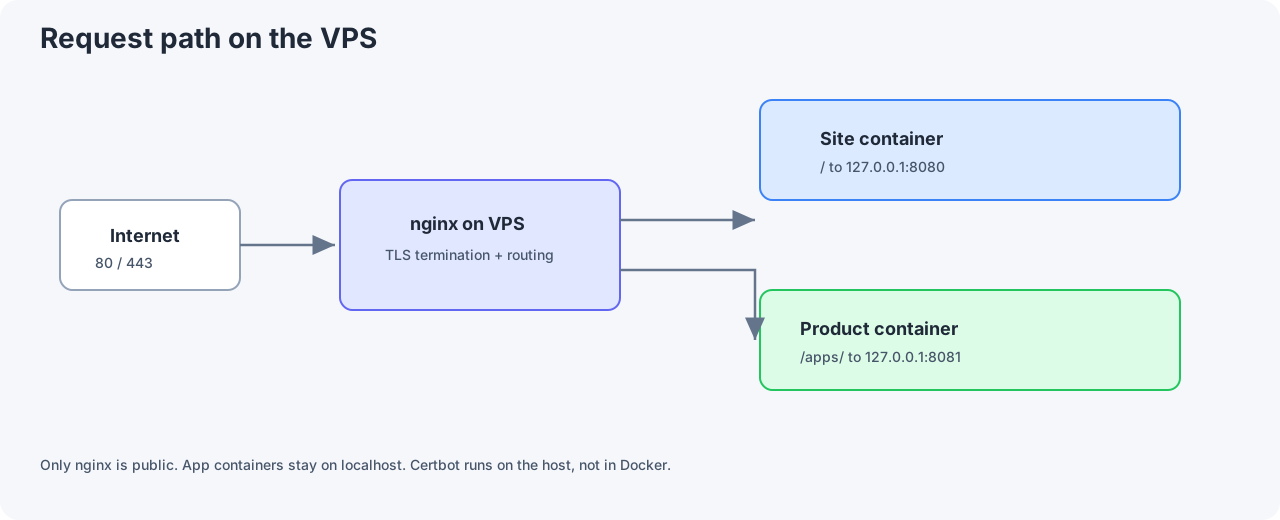
Traffic comes into nginx on the VPS (80/443). nginx routes / to the site container (127.0.0.1:8080) and /apps/ to the product container (127.0.0.1:8081).
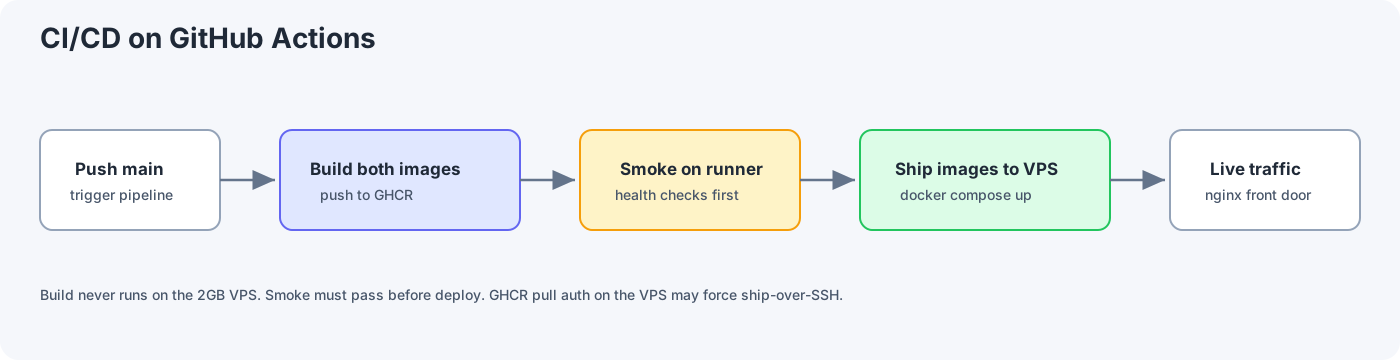
The CI/CD flow is straightforward:
- Push to
main. - Build site and product images in GitHub Actions.
- Push images to GHCR.
- Run smoke tests on the runner.
- Ship images to the VPS and run
docker compose up.
Containers are not exposed to the internet directly. Only nginx is public. Certbot runs on the nginx host, not inside Docker, which keeps TLS and routing simpler.
Infra layout in the repo
We split concerns clearly:
| Path | Role |
|---|---|
infra/platforms/shared/ | docker-compose and deploy scripts shared across VPS providers |
infra/platforms/vultr/ | bootstrap, nginx template, and config sync for Vultr |
infra/platforms/gcp/ | Terraform for Cloud Run failover |
Later, moving to Hetzner means copying vultr/ to hetzner/, then adjusting bootstrap. shared/ stays.
On the VPS, runtime lives at a fixed workspace path, for example:
/home/<deploy-user>/workspace/projects/<repo-name>/
One-time bootstrap is at ~/workspace/bootstrap/vultr/. We skipped /opt because the team already had a workspace layout. Pick paths and stick to them.
GitHub: setup before the workflow
Secrets
In the repo, go to Settings, then Secrets:
| Secret | Purpose |
|---|---|
VULTR_HOST | VPS IP |
VULTR_USER | SSH user (e.g. deploy) |
VULTR_SSH_KEY | Deploy private key |
Create a dedicated key pair for CI and add the public key to authorized_keys on the VPS. Do not reuse your daily personal key.
Org permissions for Actions
If your GitHub org locks GITHUB_TOKEN to read-only, the build job cannot push to GHCR. An org owner must enable Read and write at org level, or the job must declare permissions: packages: write.
GHCR is lowercase: org MyOrg becomes image ghcr.io/myorg/my-web/site:sha-xxxxxxx. Tags use sha- plus 7 commit chars so you always know which revision is running.
After the first build, open Packages, connect your repo, then grant Actions access. Skipping this often causes smoke test failures.
Workflow: three jobs, one pipeline
File: .github/workflows/deploy-production.yml
| Job | What it does |
|---|---|
| build | Build and push site + product images; tag sha-xxxxxxx and latest |
| smoke | Pull on runner, run containers, curl /api/health and /apps/<product-slug> |
| deploy | Ship images to VPS, compose up |
If smoke passes but deploy fails, the problem is usually SSH or the VPS, not the build.
GHCR pull on VPS vs shipping the image over SSH
First attempt on the VPS used the usual pattern:
docker login ghcr.io
docker compose pull
docker compose up -d
On the runner this worked. On the VPS it failed with 403 Forbidden, even with a PAT scoped to read:packages, and even when piping GITHUB_TOKEN from CI over SSH.
curl to the GitHub user API returned 200. curl to the GHCR manifest returned 403. The token was still valid, but it could not read the org package. Manage Actions access on the package helps workflows in that repo, not arbitrary VPS pulls with a personal PAT.
What we chose
We switched to shipping images from CI: runner pulls (smoke already OK), runs docker save, compresses, copies to VPS /tmp/, runs docker load, deletes the tarball, then executes DEPLOY_SKIP_PULL=1 ./scripts/deploy.sh.
| Pull on VPS | Ship over SSH | |
|---|---|---|
| GHCR auth on VPS | Required | Not required |
| Bandwidth | Smaller if layers cache | Larger each deploy |
| Reliability (our case) | Failed with 403 | Works |
We ship over SSH for now. For a small VPS and low traffic, a few extra minutes per deploy is fine. If org GHCR permissions get fixed, we can switch back to pull. deploy.sh supports both paths.
/tmp/ is only a short-lived tarball staging area, not where the app runs. Delete after docker load.
First-time VPS setup (bootstrap)
bootstrap.sh installs: Docker, nginx, certbot, ufw, 2GB swap (without swap, 2GB RAM hangs easily), copies nginx config to /etc/nginx/sites-enabled/<app-name>.
Re-SSH after bootstrap so the docker group applies.
We once had healthy containers but no site because bootstrap had not run, so there was no nginx config. Green docker ps does not mean production is done.
Quick checks:
ls /etc/nginx/sites-enabled/<app-name>
curl -H "Host: example.com" http://127.0.0.1/api/health
DNS and Certbot
At your DNS provider:
- A
@to VPS IP - A
wwwto VPS IP - Remove stray AAAA if the VPS has no real IPv6
Certbot failed with 404; logs showed odd IPv6 (2001:4860:...). Let's Encrypt was hitting the wrong host. Remove AAAA, wait for DNS, then:
curl http://example.com/.well-known/acme-challenge/test
When HTTP is stable:
sudo certbot --nginx -d example.com -d www.example.com
CSS bug: two Next.js apps, one domain
The product app HTML loads under /apps/... (product container). Default Next.js CSS lives at /_next/static/..., while nginx routes / to the site container.
Result: the product page renders text, no styles. DevTools: CSS 404 or wrong file.
Fix: assetPrefix: "/apps" in apps/web/next.config.ts. Assets become /apps/_next/static/... and hit the product upstream.
Two apps on one domain: plan static asset routing up front, not after launch.
After setup: what each release looks like
Mostly:
- Merge / push
main - Actions green (build, smoke, deploy)
- Browser check; hard refresh if CSS/JS changed
No manual SSH deploy. No GHCR pull on the VPS (with our current ship-over-SSH path).
CI does not change nginx or certs. Reverse proxy or TLS changes are manual on VPS.
- Runtime env (non-public vars in
.env): edit on VPS,docker compose up -d NEXT_PUBLIC_*: requires a new image build because values are baked at build time
Checklist
- GitHub secrets
VULTR_*, org Actions permissions - VPS: bootstrap + sync config +
.env - DNS A records; no bogus AAAA
- Push
main, wait for CI - Certbot after HTTP works
- Verify main site and product path (e.g.
https://example.com/andhttps://example.com/apps/<product-slug>)
Full copy-paste commands belong in your repo runbook (e.g. docs/PRODUCTION-DEPLOY.md).
Production is more than docker run: DNS, nginx, TLS, registry auth, and routing two Next.js apps on one hostname. The diagram in tutorials rarely matches org GHCR policy.
A 2GB VPS works if you build in CI, terminate TLS at nginx, and remember GHCR 403 often means org or package access issues, not just a missing PAT.