Docker blueprint: architecture and the commands that matter
1. Docker vs virtual machine
To understand why containers start fast, focus on the kernel boundary:
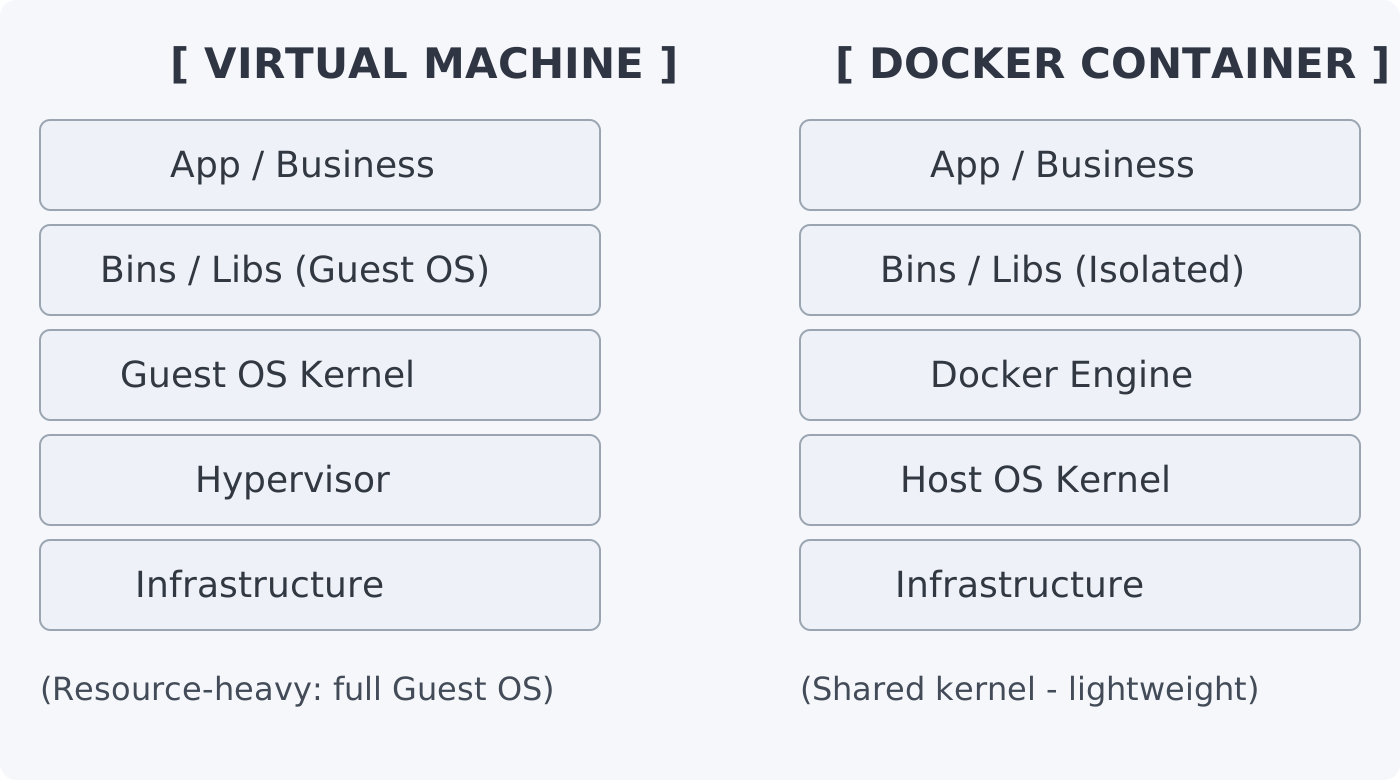
- A VM includes a full guest OS and usually runs through a hypervisor layer.
- A container shares the host kernel and isolates user-space processes.
- Because there is no extra guest kernel per workload, memory and startup overhead are usually lower.
2. Core commands
A. Image management
Build an image:
docker build -t <name>:<tag> .
Remove dangling images (failed builds, free disk space):
docker image prune
Inspect layers (see what makes an image heavy):
docker history <image_id>
B. Container lifecycle
Run app and map port:
docker run -d -p 8080:3000 --name my-app <image>
-d: Run in the background (detached).-p 8080:3000: Host port 8080 maps to container port 3000.
Stream logs (essential for debugging):
docker logs -f <container_name>
Shell into a running container:
docker exec -it <container_name> /bin/sh
C. Cleanup
Full cleanup (containers, images, networks, volumes not in use):
docker system prune -a --volumes
Use when disk is full. This removes everything unused.
3. Networking
In a stack like NestJS + Kafka + PostgreSQL, containers need to talk to each other.
Create a custom network:
docker network create my-system-net
Attach services: When you run a container, add --network my-system-net.
Internal DNS: Containers can reach each other by name (e.g. NestJS connects to Postgres at postgres:5432 instead of an IP).
4. Docker Compose
Use a single docker-compose.yml to define and run the whole stack instead of many manual commands.
version: '3.8'
services:
  api-gateway:
    build: .
    ports:
      - "3000:3000"
    depends_on:
      - redis
      - db
    networks:
      - backend-net

  db:
    image: postgres:15-alpine
    volumes:
      - db-data:/var/lib/postgresql/data
    environment:
      POSTGRES_PASSWORD: ${DB_PASSWORD}
    networks:
      - backend-net

networks:
  backend-net:
    driver: bridge

volumes:
  db-data:
5. Checklist
Persistence: Always use volumes for databases. If the container is removed, data remains.
Security:
- Never put secrets in the Dockerfile. Use
.envandenvironmentin Compose. - Prefer Alpine-based images to reduce attack surface.
Optimization:
- Layer order in Dockerfile: Put commands that change less often (e.g.
npm install) higher so the build cache is reused. - Use
.dockerignoreto excludenode_modules,.git, etc. from the build context. Builds can be much faster.