Edge video AI pipelines: queues, DAG runtimes, and real bottlenecks
This note is a practical systems sketch for shipping stable video analytics on embedded SoCs. It stays SDK-agnostic: swap decoder, NPU runtime, and queue policies to fit your platform. Topics: DAG topology, buffer contracts, scheduling, and the limits (DRAM, thermal, fabric) that show up under real load, not only on slides.
Goal: reason about p95/p99 latency, drops, and jitter with the same discipline as OS scheduling and memory: name the bottleneck, then optimize the critical path.
Table of contents
- Scenario
- DAG plus queues, not DAG alone
- Map stages to executors
- Sample shape: stages and a minimal scheduler loop
- Bottlenecks beyond FLOPs
- Profiling the critical path
- Checklist
1. Scenario
Assume:
- One inbound stream: 1080p30 (could scale to N streams later).
- Decode from compressed video (vendor decoder on DSP/VDEC or CPU fallback).
- Preprocess: resize, mean/variance, layout conversion.
- Detector: INT8 network on NPU (or GPU where that is the only option).
- Tracker and business logic: mostly CPU.
- Output: overlay, encode, or metadata only.
In production, the painful failure mode is usually not “model accuracy on a slide.” It is p95/p99 latency, frame drops, and jitter when the SoC gets hot or DRAM gets busy.
2. DAG plus queues, not DAG alone
A DAG drawn on a whiteboard is topology. A shipped engine needs edges with semantics:
- Buffer ownership (who allocates, who releases, who may alias).
- Backpressure (what happens when the next stage is slower).
- Failure policy (drop oldest, block, degrade resolution, skip inference every K frames).
The mental picture to implement is DAG nodes plus bounded queues between them, not only "node A calls node B."
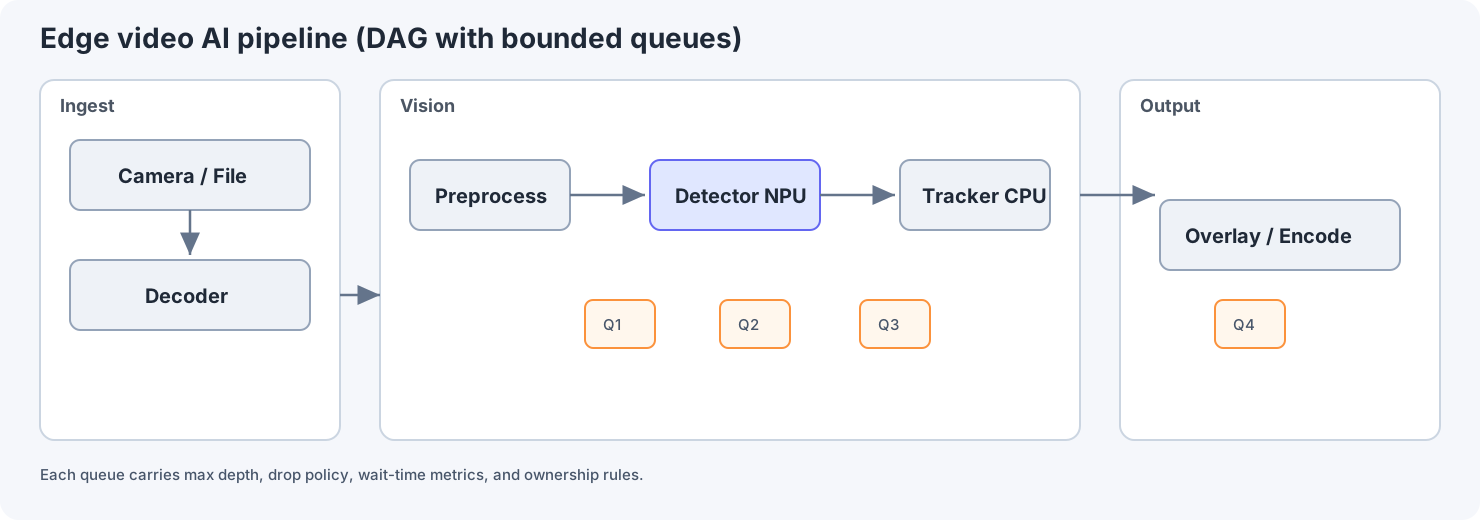
A typical order is ingest (camera/file then decoder), vision (preprocess, detector, tracker), then output (overlay/encode). Put a bounded queue between each stage and define queue depth, drop policy, and metrics for every edge.
Those stage queues are not decorative. They are where you implement max depth, drop policy, and metrics (wait time, utilization).
3. Map stages to executors
Below is a pattern table, not a universal law. Names change per vendor (DSP, VPU, NPU, GPU).
| Stage | Typical executor | Why | Risk if misplaced |
|---|---|---|---|
| Decode | Hardware decoder or DSP | Bitstream work should not starve the rest | CPU pegged, everything else drifts |
| Preprocess | GPU shader, NEON, or vendor image DSP | High pixel volume | Extra copies through DRAM |
| Detector | NPU or GPU | Convolution-heavy | Deep queues hide latency until they explode |
| Tracker | CPU | Small tensors, branching logic | Lock contention if shared with unrelated work |
Scheduling here is not only “a thread pool.” It is mapping nodes to executors plus policies (priority, affinity, batching rules).
4. Sample shape: stages and a minimal scheduler loop
The following is illustrative pseudo-C++ for handles, queues, stage functions, and policy hooks. It is not a drop-in library.
// Opaque buffer id: pool index, dmabuf handle, or vendor token.
struct BufferHandle { uint32_t id; };

template <typename T>
struct BoundedQueue {
  bool try_push(const T&);   // returns false when full (backpressure)
  bool try_pop(T& out);
  size_t depth() const;
};

struct StageCtx {
  BoundedQueue<BufferHandle>* in_q;
  BoundedQueue<BufferHandle>* out_q;
};

void run_preprocess(StageCtx& ctx) {
  BufferHandle in, out;
  while (ctx.in_q->try_pop(in)) {
    // map in, produce out, or recycle on failure
    if (!allocate_output(out)) {
      release(in);
      continue;
    }
    preprocess(in, out);
    while (!ctx.out_q->try_push(out)) {
      // policy: spin, sleep, or drop according to product rules
    }
    release(in);
  }
}
Review focus for this shape
- Clear ownership transitions (
release,allocate_output). - A place to attach metrics (
depth(), wait intry_push). - No hidden copies in the “happy path” comments (real code still needs explicit sync).
5. Bottlenecks beyond FLOPs
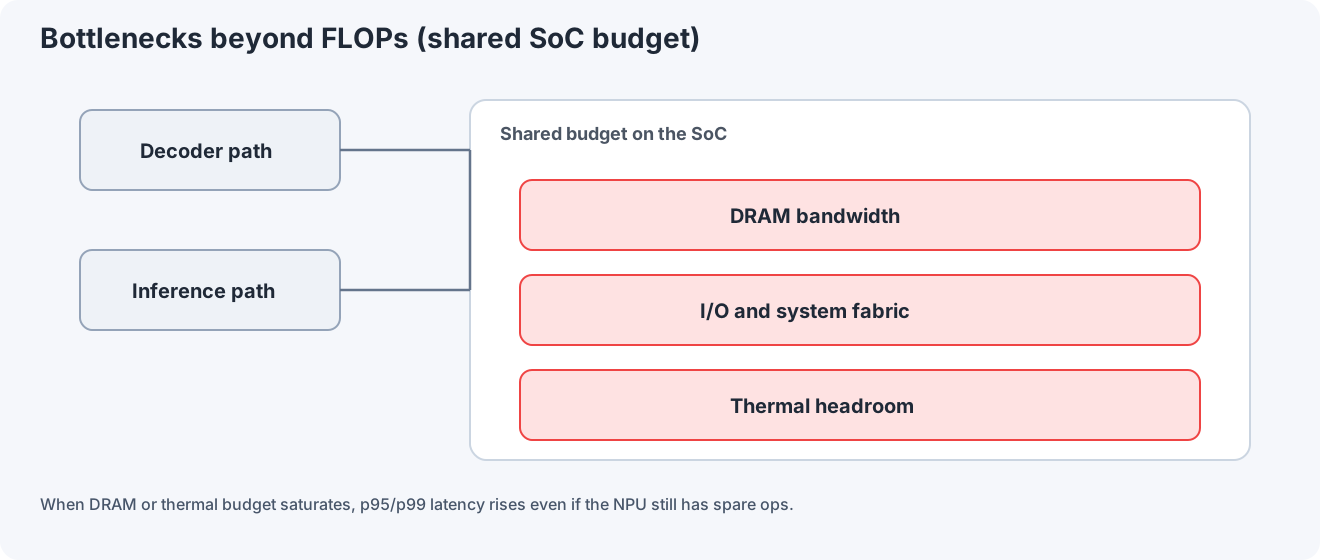
At runtime, decoder and inference stages compete for shared SoC budgets: DRAM bandwidth, system fabric or I/O bandwidth, and thermal headroom. This shared pressure is often the real limit before raw compute is exhausted.
DRAM bandwidth: Large feature maps, suboptimal strides, or extra color converts can saturate memory before the NPU runs out of ops.
Thermal: Sustained load reduces clocks. Jitter rises. A pipeline that looked fine for five minutes fails after twenty.
PCIe / fabric: Matters when accelerators or cameras are off-chip. Even on-chip, contention on shared buses still appears in integrated designs under stress.
6. Profiling the critical path
Use vendor tools where available (GPU/NPU timelines), plus system-wide views (perf, eBPF, Nsight Systems, or equivalents). Then:
- Identify the longest dependent chain per frame (critical path).
- Decide whether the next optimization belongs there or in queue policy and memory traffic.
Optimizing a kernel that is not on the critical path is a common way to waste weeks.
7. Checklist
- Every edge between stages has max queue depth and policy under pressure.
- You can name the one system bottleneck for your workload (DRAM, thermal, PCIe/fabric, or a specific stage).
- Latency numbers are reported with percentiles, not only averages.
- The team agrees what degradation means before it is needed in the field.
Illustrative architecture note. Tune numbers and policies to your SoC, OS, and product SLA.