Ops blueprint: a deployment playbook you can reuse
This playbook is a practical guide you can reuse for a web app, an API, or a multi-container stack. It stays framework-agnostic: swap service names, paths, and env vars to fit your project.
Table of contents
- Executive summary
- Deployment architecture patterns
- Standard deployment flow
- Environment & secrets model
- Build/runtime compatibility pitfalls
- Database lifecycle
- Security baseline
- Incident response checklist
- Docker/Compose handbook templates
- Quick command templates
1. Executive summary
Goals:
- Repeatable builds: same inputs produce the same artifact.
- Runtime parity: what runs in prod matches what you tested.
- Controlled releases: you know what version is live.
- Clear rollback: you can go back without guessing.
- Security and supply chain: handled early, not as an afterthought.
Standard flow:
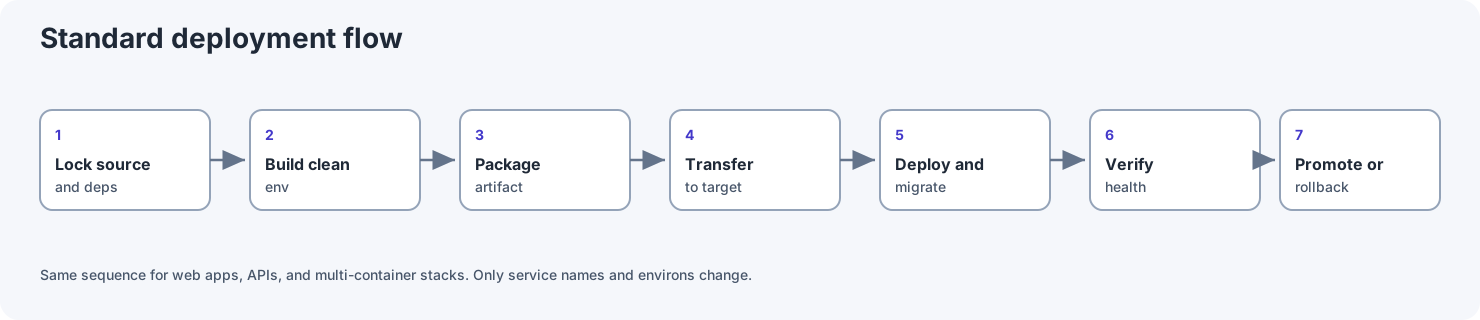
- Lock source and dependencies.
- Build in a clean environment.
- Package the artifact.
- Transfer only required deploy assets.
- Deploy and run migrations.
- Verify health and smoke tests.
- Promote release or rollback.
2. Deployment architecture patterns
2.1 Build on the host (fast dev loop)
- Pros: quick feedback, easy debugging.
- Cons: your laptop OS/arch/libs may differ from the server, which creates "works on my machine" surprises.
2.2 Build inside Docker (recommended for parity)
- Build in a Linux image that matches (or is very close to) production: same distro, libc (glibc vs musl), CPU arch.
- Use
docker build --platform ...when the server arch differs from your laptop.
2.3 Build on CI, promote the artifact
- CI builds the image, tags it (semver or git SHA), pushes to a registry (GHCR, ECR, Harbor, etc.).
- The server only pulls and runs, with no compiler toolchain on the VPS.
2.4 Artifact without a registry
- Use
docker saveto create a.tar, copy withscporrsync, then rundocker loadon the server. - Good for air-gapped networks or minimal setups.
2.5 Minimal deploy surface
- Sync only what you need: compose files, scripts, env templates, optional image tar.
- Avoid syncing the whole repo if it is not required. You get a smaller attack surface and faster transfers.
3. Standard deployment flow
A. Prepare source and lock dependencies
- Commit lockfiles (
package-lock.json,pnpm-lock.yaml,go.sum, etc.). - Tag a release or at least record the exact commit you deploy.
B. Build
- Host build: follow project README; keep build-time secrets out of production values.
- Docker build: prefer multi-stage; use
.dockerignoreso you do not copynode_modules,.git, or build cache junk into the image.
C. Package
- Tag images clearly (
app:1.2.3). Optionally export tar if you skip a registry.
D. Transfer
- Registry:
docker push. - No registry: ship tar + compose + sample env.
E. Release
- Start the database first with a healthcheck; wait until it is ready before starting app services that depend on it.
- Run migrations with a strategy that matches your downtime goals (zero-downtime often needs backward-compatible migrations).
F. Verify
- Health/readiness checks pass.
- Smoke tests pass (a couple of critical paths).
- Logs show no boot loops or repeating errors.
G. Rollback
- Keep the previous image tag handy.
- If a migration is risky, have a DB backup and a tested restore path.
4. Environment & secrets model
4.1 Config layers
- Platform: DB host, port, TLS mode, often injected on the server.
- App: API URLs, feature flags.
- Runtime:
NODE_ENV, worker concurrency, and similar values that change less often across environments.
4.2 File conventions
.env.examplelists required keys with no real secrets.- Real secrets live in a vault, a cloud secret manager, or a file on the server outside git.
- Never commit production
.envfiles.
4.3 Rotate secrets
If you suspect a leak, rotate DB password, JWT or session secrets, and API keys. Prioritize public-facing services first.
4.4 Changing only .env: do you need to rebuild the image?
- Runtime env read at container start: you do not need a new image. You do need to recreate the container so it picks up new env values (Docker does not hot-reload env for a running container).
- Build-time variables baked into the bundle (e.g. some
NEXT_PUBLIC_*values): you must rebuild the app and image.
Minimal recreate:
docker compose -f deploy/docker-compose.yaml up -d --force-recreate web
Check env inside the container:
docker compose -f deploy/docker-compose.yaml exec web sh -c 'printenv | grep -E "DATABASE|API|NODE" | sort'
5. Build/runtime compatibility pitfalls
5.1 CPU architecture mismatch
- Building
arm64and runningamd64(or the reverse) causes errors or slow emulation. - Fix: build with the correct
--platform, or build on CI that targets the server arch.
5.2 glibc vs musl (Alpine)
- Native binaries (ORM, crypto) may behave differently.
- Fix: build and test with the same base image family you use in production.
5.3 OpenSSL / TLS library mismatch
- Do not run binaries built for macOS against Linux without rebuilding or using a compatible engine for the target.
5.4 node_modules copied from the host into the image
- Always exclude with
.dockerignore. - Install dependencies inside the Dockerfile (
npm ci).
6. Database lifecycle
- Use explicit volumes for data (bind mount or named volume).
- Wait for the DB to be ready before import/migrate jobs.
- Schedule backups; take a snapshot before large migrations.
7. Security baseline
Container
- Run as non-root when possible.
- Read-only root filesystem for the app layer when it fits your app.
- Set CPU/memory limits so one container cannot starve the node.
Edge
- Reverse proxy: TLS termination, sensible timeouts, body size limits.
- Rate limit sensitive routes (
/auth,/api/login).
App
- Do not execute shell commands built from raw user input.
- Validate redirect URLs (avoid open redirects).
- Use high-entropy secrets for sessions/JWT.
Supply chain
- Lock dependencies with lockfiles.
- Use
npm ci(or equivalent) in CI, and avoid ad-hocinstallon production paths. - Run vulnerability scans (
npm audit, OSV) on a schedule.
8. Incident response checklist
Warning signs
- Logs suggesting RCE:
curl | sh,base64 -d | sh, changes toauthorized_keys, odd processes. - CPU/memory spikes that do not match real traffic.
- Brute-force traffic or random paths.
Act fast
- Reduce public exposure (firewall / security group) if needed.
- Collect logs and runtime forensics (
docker inspect,docker diff, process list). - Compare image digest/tag with a clean CI build.
- Rotate secrets that might be exposed.
- Redeploy from a trusted source and watch closely for 24–48 hours.
9. Docker/Compose handbook templates
9.1 .dockerignore
.git
.github
*.md
.env
.env.*
!.env.example
node_modules
**/node_modules
**/dist
**/.next/cache
coverage
*.log
9.2 Dockerfile API (multi-stage)
FROM node:20-bookworm-slim AS builder
WORKDIR /app
COPY services/api/package.json services/api/package-lock.json* ./
RUN npm ci --omit=dev
COPY services/api .
RUN npm run build

FROM node:20-bookworm-slim
WORKDIR /app
ENV NODE_ENV=production
COPY --from=builder /app/package.json ./
COPY --from=builder /app/node_modules ./node_modules
COPY --from=builder /app/dist ./dist
RUN addgroup --system app && adduser --system --ingroup app app \
  && chown -R app:app /app
USER app
EXPOSE 4000
CMD ["node", "dist/server.js"]
9.3 Dockerfile web static (Nginx)
FROM nginx:1.27-alpine
COPY apps/web/dist /usr/share/nginx/html:ro
EXPOSE 80
9.4 Docker Compose template
name: acme-local

services:
  db:
    image: postgres:16-alpine
    environment:
      POSTGRES_USER: app
      POSTGRES_PASSWORD: ${DB_PASSWORD}
      POSTGRES_DB: app
    volumes:
      - pgdata:/var/lib/postgresql/data
    ports:
      - "127.0.0.1:5432:5432"
    healthcheck:
      test: ["CMD-SHELL", "pg_isready -U app -d app"]
      interval: 5s
      timeout: 3s
      retries: 10

  api:
    build:
      context: ..
      dockerfile: deploy/Dockerfile.api
    image: myorg/api:${APP_VERSION:-latest}
    env_file:
      - ../services/api/.env
    environment:
      DATABASE_URL: postgresql://app:${DB_PASSWORD}@db:5432/app
      PORT: 4000
    ports:
      - "127.0.0.1:4000:4000"
    depends_on:
      db:
        condition: service_healthy
    restart: unless-stopped

  web:
    build:
      context: ..
      dockerfile: deploy/Dockerfile.web
    image: myorg/web:${APP_VERSION:-latest}
    ports:
      - "127.0.0.1:8080:80"
    depends_on:
      - api
    restart: unless-stopped

volumes:
  pgdata:
9.5 Runtime env sample
DB_PASSWORD=change-me-strong
APP_VERSION=1.0.0
10. Quick command templates
Build and run
export DOCKER_DEFAULT_PLATFORM=linux/amd64
docker compose --env-file deploy/.env -f deploy/docker-compose.yaml build --no-cache
docker compose --env-file deploy/.env -f deploy/docker-compose.yaml up -d
docker compose -f deploy/docker-compose.yaml ps -a
Logs and debug
docker compose -f deploy/docker-compose.yaml logs -f --tail=200 api web
docker compose -f deploy/docker-compose.yaml exec api sh -c 'printenv | sort'
docker compose -f deploy/docker-compose.yaml config
docker stats --no-stream
Tar-based deploy (no registry)
docker save -o deploy/images/api.tar myorg/api:1.0.0
docker save -o deploy/images/web.tar myorg/web:1.0.0
scp deploy/images/*.tar user@vps:/opt/acme/images/
Related diagram