Cloud Run cost defense: Armor, CDN, and locked ingress
Why the bill jumps
Cloud Run billing spiked. Logs Explorer showed the usual scanner noise:
GET /wp-login.phpGET /wp-admin/setup-config.phpGET /.env
The app is Next.js, not WordPress. No PHP on the stack. Every probe still returns 404, and you still pay for it.
Cloud Run bills requests and instance time (CPU/memory while instances handle concurrency). A scanner does not need a real page. Enough parallel junk can:
- Raise concurrency and keep instances busy on cheap 404s.
- Trigger autoscaling and cold starts when bursts outrun idle capacity.
Next.js middleware can block some of this, but it still burns container CPU. Cheaper to cut noise at the load balancer: deny obvious paths before Cloud Run sees them, and let the CDN cache 404s so repeat probes skip the origin.
Architecture: three layers
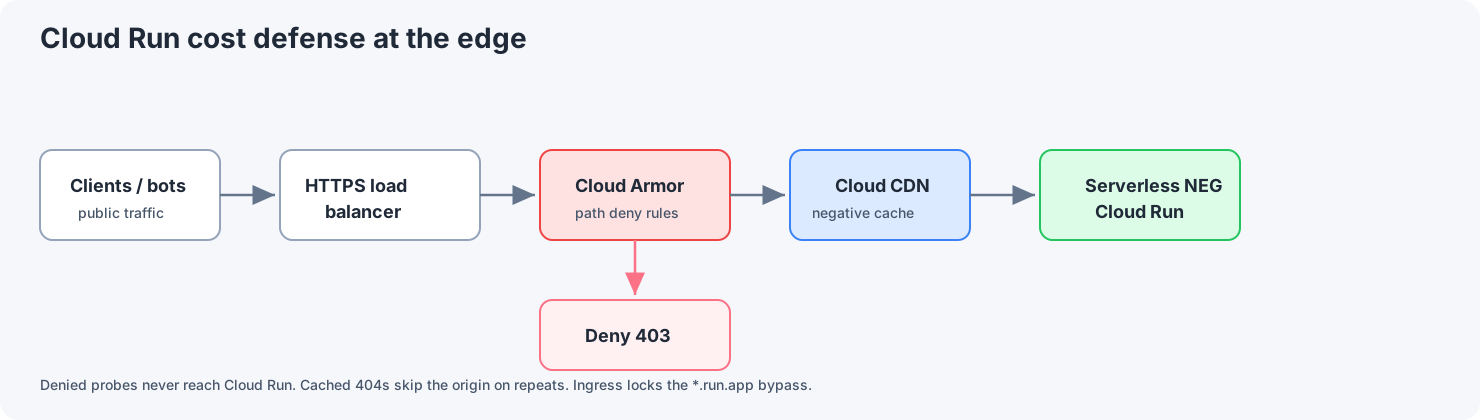
Requests hit the external HTTPS load balancer first. Cloud Armor evaluates policy there, so blocked requests are denied before they reach Cloud Run. Allowed requests then pass through Cloud CDN. Cache hits are served from the edge, and cache misses go through the serverless NEG to the Cloud Run revision.
| Layer | Role | What you gain |
|---|---|---|
| Cloud Armor | WAF-style rules on the backend service attached to the load balancer | Obvious scanner paths return 403 at the LB edge; traffic does not reach the serverless NEG or Cloud Run. |
| Cloud CDN | Edge caching, including negative caching for error responses | After a path legitimately returns 404 once, repeat requests can be served from the edge (very low origin cost). |
| Ingress control | Cloud Run accepts only internal + load-balanced traffic | The default *.run.app URL is no longer a public bypass around Armor and CDN. Users hit your domain on the LB only. |
Layer 1: Cloud Armor as the first filter
Bots rotate IPs, so a static IP block list does not scale. Custom rules in a Cloud Armor security policy use CEL (Common Expression Language) on request attributes; regex uses RE2 via matches().
Examples (tune priorities to your policy):
- PHP probes: deny paths ending in
.php(adjust if you ever serve real.phpassets; most Next.js stacks do not).
request.path.matches('(?i:.*\\.php$)')
- WordPress-shaped paths (normalize case if your clients send odd casing.
containsis literal;request.path.lower()is an option per the rules language reference):
request.path.contains('/wp-admin/') || request.path.contains('/wp-content/')
- Sensitive file extensions (extend as needed):
request.path.matches('(?i:.*\\.(env|git|bak|sql|config)(/|$))')
Rules that matter:
- Put specific rules above broad ones in priority order.
- Managed rules (OWASP CRS, Google-managed rules, Adaptive Protection) catch attack classes regex misses and are worth adding on top of path blocks.
- False positives: test in preview mode if you can, then
deny(403)(ordeny(404)if you do not want to advertise a block).
Deny actions evaluated at the load balancer mean those requests never invoke Cloud Run: no container CPU for that request line item.
Layer 2: CDN negative caching, not "cache everything"
Do not turn on force-cache-all (CACHE_MODE_FORCE_CACHE_ALL or the console equivalent) for a dynamic Next.js app. It can cache 200 responses that should stay private or vary per user.
For scanner traffic, use negative caching:
- Configure the backend service / CDN settings so 404 (and optionally 403 if your origin returns them for unknown routes) can be cached at the edge for a bounded TTL (for example many hours for static junk paths).
- Trade-off: a long 404 TTL also freezes real mistakes. Ship a bad route, and the edge may keep serving 404 until expiry. Balance scan noise vs recovery time, or purge cache when possible.
Use normal cache rules for static assets (public/, hashed filenames). Do not force one cache mode over the whole app.
Layer 3: Close the *.run.app bypass
If the load balancer is public but the Cloud Run service URL is still open to the internet, scanners will hit https://<service>-<hash>-<region>.a.run.app directly and skip Cloud Armor and CDN.
Fix (console wording): set Cloud Run Ingress to Allow internal traffic and traffic from Cloud Load Balancing. At the API level, ingress is limited to internal sources and Google Cloud external HTTP(S) load balancers. See current Cloud Run ingress documentation for exact labels in your project.
Pair that with DNS and TLS on the external HTTPS load balancer as the only customer-facing entry.
Setup steps
- Serverless NEG: point a serverless Network Endpoint Group at the Cloud Run service (region, service name).
- Backend service: use that NEG as the backend; enable Cloud CDN when it fits your caching plan.
- URL map + HTTPS proxy + forwarding rule: create a global external Application Load Balancer (HTTP/S) in front of the backend.
- Cloud Armor: create a security policy, attach it to the backend service, and add CEL rules (start strict on obvious scanner paths).
- CDN tuning: enable negative caching for 404 (optional 403); avoid blanket force-cache-all for dynamic apps.
- Cloud Run ingress: restrict to internal + Cloud Load Balancing; verify the default
run.appURL no longer accepts public probes. - Validate: run
curlagainst the LB hostname and directrun.app; confirm denied paths never appear in Cloud Run request logs.
What to look for in logs
Log field names change between schema versions; search by intent:
- Load Balancer / Armor: filter for deny outcomes, matched rule names, and low backend request volume for garbage paths.
- CDN: filter for cache fill / hit indicators vs origin round-trips; repeat scans of the same dead path should show edge satisfaction rather than new Cloud Run instances spinning up.
- Cloud Run: request logs trend toward legitimate routes (for example 200 on real pages) rather than dense 404 storms during idle periods.
Before hardening, "Starting new instance" often lined up with scan bursts. Afterward that noise drops on blocked paths. The origin either never sees them, or sees them once per cache key before negative caching kicks in.
LB cost
A global HTTPS load balancer is not free. Forwarding rules, proxy infrastructure, and data processing costs vary by region.
It is still cheaper than letting scanner concurrency drive Cloud Run instance time without a cap.
Middleware can express policy; it spends container resources. Cloud Armor on the backend service, CDN negative caching where safe, and ingress locked to load balancing only cut junk before your revision runs.
For Terraform, codify the NEG, backend service, URL map, Armor attachment, and CDN flags next to the Cloud Run service, using the same split as in the Cloud Run delivery-flow write-up.