Kafka in real systems: the event log, consumer groups, and replay
Kafka is at its best when work can happen after a request, without making the user wait.
If you remember one sentence from this post, make it this one: Kafka is a durable event log that many consumers can read, each at its own pace.
Contents
- The scenario
- Queue vs log, in plain language
- The four ideas you need
- A small TypeScript example: produce, consume, replay
- Expect duplicates
- What LinkedIn and Uber learned
- Where teams get hurt
- Checklist
1. The scenario
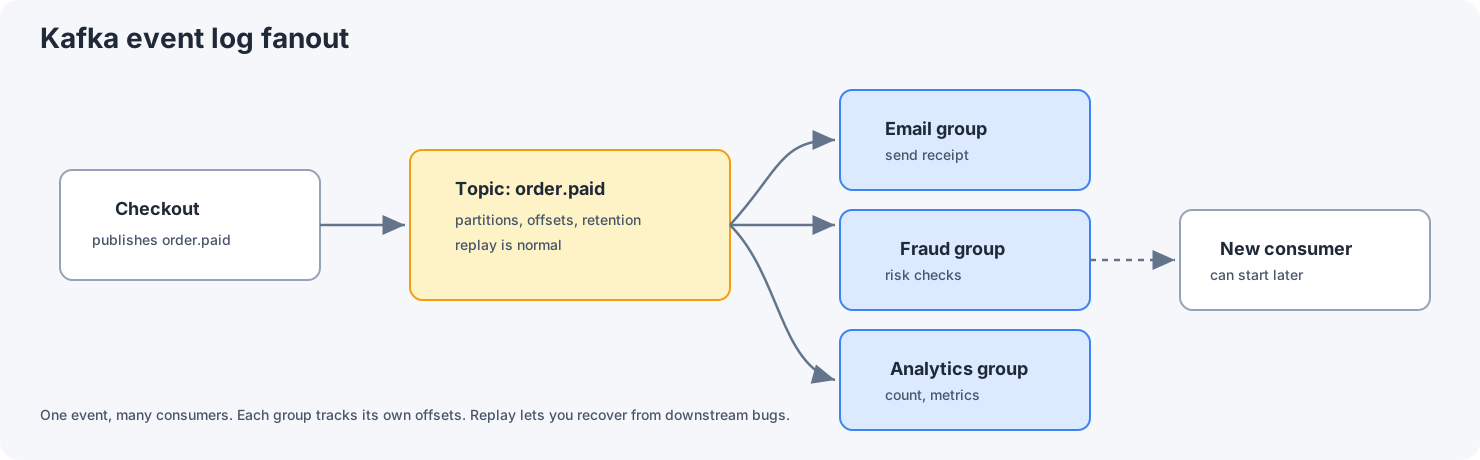
A customer checks out successfully. Now several things need to happen: send a receipt email, run fraud checks, update analytics, and notify the warehouse.
If Checkout calls each of those services directly and waits:
- The response time becomes the sum of all of them.
- Any one slow service makes the customer wait.
- A short outage in one service breaks checkout completely.
Instead, Checkout publishes a single event, order.paid, and each downstream service picks it up and does its work in the background.
2. Queue vs log, in plain language
It's tempting to think of Kafka as "just a queue", and that leads to poor designs.
A queue hands each message to one worker, and the message disappears once it's handled.
A log, which is what Kafka is, works differently:
- Events are appended to the end of the log and kept for a set retention period.
- Each consumer keeps track of its own position, called the offset.
- Several consumer groups can read the same events independently.
- Replaying old events is a normal operation, not an emergency measure.
That's why Kafka fits so well when many systems need to react to the same event.
3. The four ideas you need
You don't need to know Kafka's internals to use it well. You need four ideas:
- Topic: a named stream of events, such as
order.paid. - Partition: a slice of a topic. Events are in order within a partition.
- Offset: a consumer group's position in a partition.
- Consumer group: a set of service instances that share the work of reading a topic.
That has two important consequences. Ordering is only guaranteed within a partition, not across the whole topic, so events that must stay in order (for example, everything about one order) need the same key. And a consumer group can't have more active consumers than there are partitions, so the partition count sets your ceiling for scaling.
4. A small TypeScript example: produce, consume, replay
This uses kafkajs, which is easy to read for examples. Note that it's no longer actively maintained, so for new production work also look at Confluent's official JavaScript client, @confluentinc/kafka-javascript.
The producer, in the Checkout service:
import { Kafka } from 'kafkajs';

const kafka = new Kafka({ clientId: 'checkout', brokers: ['localhost:9092'] });
const producer = kafka.producer();

await producer.connect();
await producer.send({
  topic: 'order.paid',
  messages: [
    {
      key: 'order-123', // same key, same partition, so events for one order stay in order
      value: JSON.stringify({ eventId: 'evt-9f2c', orderId: 'order-123', amount: 1999 }),
    },
  ],
});
The consumer, in the email service:
import { Kafka } from 'kafkajs';

const kafka = new Kafka({ clientId: 'email', brokers: ['localhost:9092'] });
const consumer = kafka.consumer({ groupId: 'email-receipts' });

await consumer.connect();
await consumer.subscribe({ topic: 'order.paid', fromBeginning: false });

await consumer.run({
  eachMessage: async ({ message }) => {
    const payload = message.value ? JSON.parse(message.value.toString()) : null;
    if (!payload) return;
    // Send the email. By default the offset is committed after this
    // function finishes, so if it throws, the message will be retried.
  },
});
Replaying events
There are two ways to reprocess events:
- Start a new consumer group with
fromBeginning: true. It reads the topic from the oldest event still kept. A new group withfromBeginning: falsestarts at the newest event, so it won't replay anything. - Reset the offsets of an existing group, for example with the
kafka-consumer-groupstool. Stop the group first, and be sure of the position you're resetting to.
Either way, you can only replay what's still within the topic's retention period. And a replay sends events through your handlers again, so it's only safe if they handle duplicates (see the next section). You don't want to resend a year of receipt emails.
Done right, replay is how you recover from a bug in a downstream service without asking the upstream team to send everything again.
5. Expect duplicates
With the usual Kafka setup, delivery is "at least once", which means the same event can arrive more than once.
Teams new to Kafka often learn this the hard way: a customer gets two receipt emails, an action runs twice, or analytics count the same order twice.
The answer isn't to hope for perfect delivery. It's to make every consumer safe to run twice on the same event. The common ways to do that are:
- Give each event a unique ID, and store the IDs you've already processed.
- Write with upserts, for example
INSERT ... ON CONFLICT DO NOTHING. - Design handlers so that running them again has no extra effect.
Kafka does offer exactly-once processing, but only for reading and writing within Kafka itself. Once your handler sends an email or calls another API, you're back to handling duplicates yourself.
6. What LinkedIn and Uber learned
LinkedIn: one central data pipeline
Kafka was created at LinkedIn as a central pipeline for the company's data, and LinkedIn still runs it at very large scale (see Running Kafka at scale). The key lesson is that a durable log lets many teams build their own consumers without depending on, or coordinating with, the team that produces the data.
Uber: Kafka between microservices
Uber uses Kafka heavily for messaging between its services. They also built a Consumer Proxy that sits between Kafka and their services, to take common consumer mistakes and operational work off each team (see Uber's post on Kafka async queuing with Consumer Proxy).
7. Where teams get hurt
7.1 Using Kafka when you need an answer now
Kafka isn't built for "please reply right away." If the caller needs a response within a set time, use gRPC or HTTP.
7.2 Too few partitions
One partition means one lane, and your consumer group can't scale past it. Choose a partition count with growth in mind, but don't go overboard. You can add partitions later, but doing so changes which partition each key maps to, which can break ordering for existing keys.
7.3 No rules for the data format
Free-form JSON gets messy fast. As more teams join, you'll want schemas (Avro, Protobuf, or JSON Schema), a schema registry, and clear rules for changing them.
7.4 Ignoring consumers falling behind
Consumers fall behind sometimes. That's normal. What matters is that you notice and have a plan.
Monitor consumer lag (how far behind each group is), error rates, and retries. And decide in advance what you'll do when a group falls behind: add consumers (up to the partition count), skip non-critical work, or slow down producers at the source.
8. Checklist
Before choosing Kafka for a workflow, check that:
- The work can happen in the background.
- You're fine with other systems catching up a little later (eventual consistency).
- Every consumer handles duplicates safely.
- You have a plan for replays and backfills, and retention is long enough for them.
- You can operate it: lag, retries, partitions, and retention.
If you need an immediate answer with a strict time limit, use gRPC instead.