Stopping bot traffic from running up your Cloud Run bill: Cloud Armor, CDN, and locked-down ingress
Why the bill jumped
Our Cloud Run bill spiked. Logs Explorer showed the usual scanner traffic:
GET /wp-login.phpGET /wp-admin/setup-config.phpGET /.env
The app is Next.js, not WordPress, and there's no PHP anywhere. Every one of those requests returned a 404, and we still paid for every one.
Cloud Run charges for requests and for instance time (CPU and memory while instances are handling requests). A scanner doesn't need to find a real page to cost you money. Enough junk requests at once can:
- Keep instances busy serving cheap 404s.
- Trigger autoscaling and cold starts when bursts arrive faster than idle instances can handle them.
Next.js middleware can block some of this, but it still uses container CPU to do it. It's cheaper to stop the noise at the load balancer, before Cloud Run ever sees it, and to let the CDN cache 404s so repeated probes never reach the app.
The setup: three layers
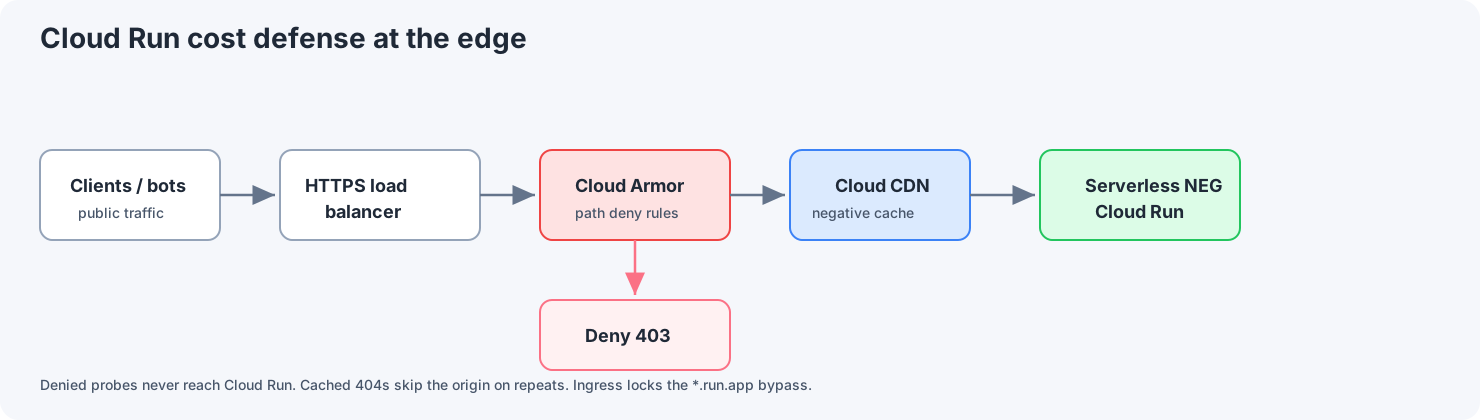
Requests arrive at an external HTTPS load balancer. Cloud CDN serves anything it already has cached. Requests that miss the cache are checked by Cloud Armor, and only the ones it allows go through to Cloud Run.
| Layer | What it does | What you get |
|---|---|---|
| Cloud Armor | Firewall rules attached to the load balancer's backend service | Obvious scanner paths are blocked at the load balancer and never reach Cloud Run |
| Cloud CDN | Caches responses at Google's edge, including error responses (negative caching) | Once a path returns a 404, repeat requests can be answered from the cache at almost no cost |
| Ingress control | Cloud Run accepts only internal and load-balanced traffic | The default *.run.app URL stops being a public back door around Armor and the CDN |
A note on the order. A normal Cloud Armor policy is a backend security policy, and it only checks requests that miss the CDN cache. Cached responses are served before it runs. If you need rules to apply before the cache too, Cloud Armor also offers edge security policies, which run before the CDN. For blocking scanners, the backend policy is enough, because blocked requests still never reach Cloud Run.
Layer 1: Cloud Armor as the first filter
Bots constantly change IP addresses, so a fixed IP block list doesn't keep up. Instead, write custom rules in a Cloud Armor security policy. Rules use CEL (Common Expression Language) to check request details, and matches() uses RE2 regular expressions.
Some examples (adjust the priorities to fit your policy):
Block PHP probes. Deny any path ending in .php. Change this if you really serve .php files, which most Next.js apps don't.
request.path.matches('(?i:.*\\.php$)')
Block WordPress paths. contains is case-sensitive, so use request.path.lower() if scanners send odd capitalization (see the rules language reference).
request.path.lower().contains('/wp-admin/') || request.path.lower().contains('/wp-content/')
Block requests for sensitive files. Extend the list as needed.
request.path.matches('(?i:.*\\.(env|git|bak|sql|config)(/|$))')
A few things matter here:
- Put specific rules at a higher priority than broad ones.
- Managed rules (OWASP Core Rule Set, Google's preconfigured rules, and Adaptive Protection) catch whole classes of attacks that path rules miss, so add them on top of your own rules.
- Rate-limiting rules are worth adding too, so a single client can't flood you even on paths you didn't think of.
- To avoid blocking real users, run new rules in preview mode first. Then switch to
deny(403), ordeny(404)if you'd rather not reveal that you're blocking.
Requests denied at the load balancer never reach Cloud Run, so they cost no container time.
Layer 2: cache 404s, not everything
Don't turn on "force cache all" (FORCE_CACHE_ALL) for a dynamic Next.js app. It can cache successful responses that should be private or that differ per user.
For scanner traffic, use negative caching instead:
- Set the CDN to cache 404 responses (and 403s, if your app returns them for unknown routes) for a limited time. For junk paths, that can be many hours.
- There's a trade-off. A long 404 cache time also preserves real mistakes. If you ship a broken route, the CDN may keep serving the 404 until it expires. Balance less scanner noise against how quickly you can recover, or invalidate the cache when you need to.
Use normal caching rules for static assets, such as files in public/ and files with hashed names. Don't force one cache mode on the whole app.
Layer 3: close the *.run.app back door
If the load balancer is public but the Cloud Run service's own URL is still open to the internet, scanners can go straight to https://<service>-<hash>-<region>.a.run.app and skip Cloud Armor and the CDN entirely.
The fix is to set Cloud Run's ingress to "Internal and Cloud Load Balancing". Cloud Run then only accepts traffic from inside your network and from Google Cloud load balancers. Check the Cloud Run ingress documentation for the exact options.
Then make the load balancer, with your domain and TLS certificate, the only public way in.
A safety net: cap the instances
Set a maximum number of instances on the Cloud Run service. If something gets past all three layers, the cap limits how much a traffic spike can cost you. Pick a number with headroom above your real peak traffic.
Setup steps
- Serverless NEG: create a serverless network endpoint group that points to the Cloud Run service.
- Backend service: use that NEG as the backend, and turn on Cloud CDN if it fits your caching plan.
- Load balancer: create a global external Application Load Balancer (URL map, HTTPS proxy, and forwarding rule) in front of the backend service.
- Cloud Armor: create a security policy, attach it to the backend service, and add your rules. Start strict on obvious scanner paths.
- CDN settings: turn on negative caching for 404s (and optionally 403s). Avoid "force cache all" for dynamic apps.
- Cloud Run ingress: restrict it to internal and Cloud Load Balancing traffic, and set a maximum instance count.
- Check it works:
curlboth the load balancer's domain and therun.appURL. Therun.appURL should refuse public requests, and blocked paths should never show up in Cloud Run's request logs.
What to look for in the logs
Log field names change between versions, so search for these patterns rather than exact field names:
- Load balancer and Cloud Armor: denied requests, which rules matched them, and very few garbage-path requests reaching the backend.
- CDN: cache hits vs trips to the origin. Repeated scans of the same dead path should be answered from the cache, not start new Cloud Run instances.
- Cloud Run: request logs should be mostly real routes (200s on real pages), not floods of 404s during quiet periods.
Before these changes, "Starting new instance" log entries often lined up with scan bursts. Afterward, that mostly went away for blocked paths. Cloud Run either never sees those requests, or sees them once per cached path before negative caching takes over.
What the load balancer costs
A global HTTPS load balancer isn't free. You pay for forwarding rules, the proxy, and data processing, and prices vary by region. It can still be cheaper than letting scanner traffic drive up Cloud Run instance time with no limit, so compare it against what the junk traffic is actually costing you.
To sum up: middleware can block bad requests, but it spends container resources doing it. Cloud Armor on the backend service, negative caching where it's safe, and ingress limited to the load balancer stop junk before your app ever runs.
If you use Terraform, define the NEG, backend service, URL map, Cloud Armor policy, and CDN settings next to the Cloud Run service, using the same structure as in Shipping to Cloud Run with Terraform and Artifact Registry.